How to Make Product Shots with AI: The Complete 2026 Guide (No Studio Required)
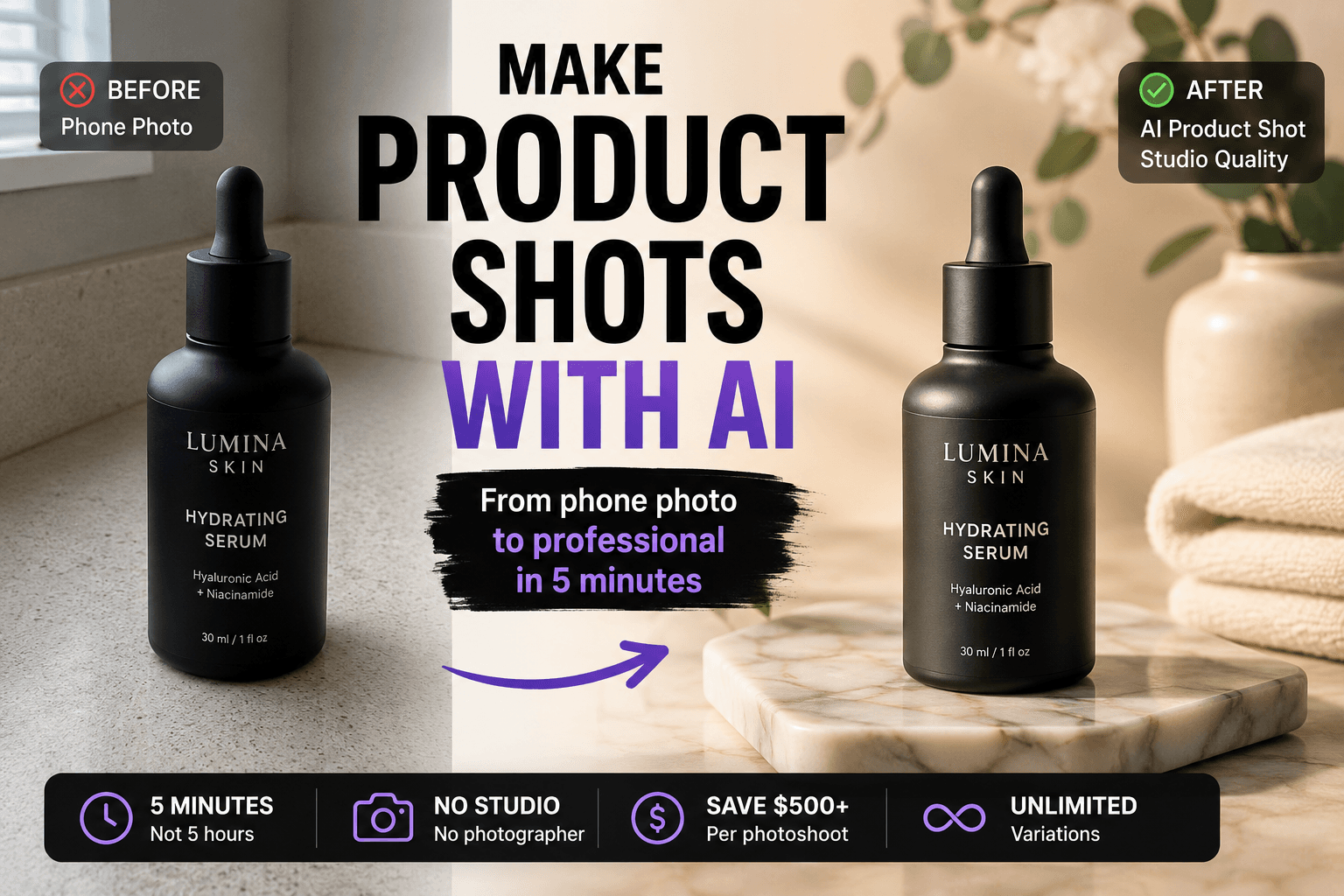
Stop paying $500 a shoot. Generate professional product shots with AI in 5 minutes — white backgrounds, lifestyle scenes, flat lays, detail close-ups. Complete workflow with 12 ready-to-use prompts and Gendia's Product Staging template.
You have a great product. You have a phone camera. You don't have $2,000 for a studio shoot.
Welcome to the gap that kills 90% of small ecommerce stores. Without professional product shots your conversion rate dies. With professional shoots your margin dies.
In 2026 AI product photography fixes this gap. You can generate hero shots, lifestyle scenes, flat lays, and detail close-ups in five minutes — without a camera, a studio, or a photographer. The frontier models hosted on Gendia (GPT Image 2, Nano Banana 2, Seedream, FLUX Kontext) produce results indistinguishable from real product photography when you prompt them right.
This is the complete workflow.
Generate professional product shots free with Gendia's Product Staging template →
The fastest way to make product shots with AI
If you're skimming, here's the entire workflow in three lines:
- Upload your product photo — even a phone snapshot works.
- Choose the shot type — hero / lifestyle / flat lay / detail / in-use.
- Run one of the 12 prompts below on Gendia's Product Staging template. Done in 5 minutes.
Now here's how to do it well.
Why AI product photography is the unfair advantage in 2026
Product photography has historically been a specialized discipline requiring studio space, lighting equipment, and trained photographers. The traditional model was built for an era when only big brands could afford it.
Traditional product photography costs:
- $500 – 2,000 per professional shoot in the US/UK
- 2 – 4 weeks turnaround for full catalog shoots
- Reshoot costs every time a season, packaging, or angle changes
- Studio rental at $80+ per hour
- Photographer fees at $100+ per hour
AI product photography costs:
- $0 – 30/month in tools
- 5 minutes per shot
- Unlimited variations of any shot
- Reshoot any time packaging changes (just regenerate)
The math is brutal. A small Etsy or Shopify seller can replace $2,000 of studio work with a $30 monthly subscription, and produce more variations than they could ever afford with a real photographer.
The only thing that matters is whether your AI shots actually convert. They will — if you follow the workflow below.
The 5 product shot types every store needs
Every successful ecommerce listing uses these five shot types in some combination. Knowing what to make is the first step.
1. Hero shot (white background)
A clean isolated product on a pure white background. The standard for marketplace listings — Amazon, eBay, Etsy, Shopify product pages. These are your "main image."
Use for: marketplace SKU images, search result thumbnails, comparison grids.
2. Lifestyle shot (in context)
The product placed in a real scene that suggests how it's used. The skincare bottle on a marble bathroom counter. The coffee mug on a sunlit desk. The handbag on a café chair.
Use for: homepage banners, ad creatives, social media, Pinterest, "Why buy this" sections.
3. Flat lay (top-down)
The product photographed from directly above, often with related props arranged around it. Visual storytelling without a 3D scene.
Use for: Instagram feed, Pinterest, packaging-focused content, catalog spreads.
4. Detail / macro shot
Extreme close-up of texture, materials, or specific features. The leather grain on a bag. The clasp on a necklace. The stitching on a sneaker. Macro photography traditionally required specialized lenses and lighting — AI replicates the look from a single source photo.
Use for: quality reassurance sections, "what's inside" panels, premium positioning.
5. In-use / on-model shot
The product being held, worn, or actively used. Builds emotional connection and shows scale.
Use for: lifestyle brand positioning, ad creatives, demonstration content.
A complete product listing in 2026 typically uses all 5 types. The good news: AI can produce all 5 from a single source photo of your product. Gendia's Product Staging template is built for exactly this flow.
The Gendia product shot workflow (step-by-step)
This is the exact workflow that produces professional results in five minutes.
Step 1 — Take one good source photo
This is the only physical work required.
Take a single clear photo of your product:
- Phone camera is fine
- Bright, even daylight (north-facing window works great)
- Product flat against a clean surface
- Full product visible, no cropping
- No motion blur, no harsh shadows, no glare
Bad source = bad output. AI can transform good source photos into great shots, but it can't recover detail that wasn't captured. Spend two minutes getting the source right.
Step 2 — Open Gendia and choose your model
Different frontier models excel at different shot types. Don't fight it — use the right tool:
- Hero shots / white backgrounds → Nano Banana 2 (cleanest edges, fastest)
- Lifestyle scenes / in-context shots → GPT Image 2 (best at scene composition and reasoning)
- Editorial / fashion / brand shots → Seedream (strongest aesthetic)
- Editing existing shots → FLUX Kontext (best at preserving original product)
Open Gendia's Product Staging template, pick the scene, upload your source photo.
Step 3 — Run a prompt from the library below
The prompt structures in the next section work across all models. Pick the one matching your shot type, swap in your product details, generate.
Step 4 — Iterate fast
First generations are rarely perfect. Don't write a new prompt — refine the existing one. Common refinements:
- "Keep the label text sharp and unchanged" (if AI distorted typography)
- "Preserve exact product geometry" (if AI changed the shape)
- "Reduce shadow on the right side" (if lighting is off)
- "Center the product in frame" (if framing is wrong)
Three iterations usually lands the shot.
Step 5 — Export and use
Download your shot. Use directly on your store, or run it through one more model for refinement (e.g., Nano Banana 2 output through FLUX Kontext for final cleanup).
12 master prompts for AI product shots
Copy these directly into Gendia. Replace [PRODUCT] with your actual product description (e.g., "matte black wireless earbuds," "ceramic ramen bowl," "leather crossbody bag in caramel brown").
Hero shots (white background)
Prompt 1 — Standard ecommerce white background
Professional product photograph of [PRODUCT] on a pure white seamless background (#FFFFFF). Soft studio lighting from above and front, eliminating harsh shadows. Slight soft natural shadow directly under the product to ground it. Centered composition, product perfectly upright, full product visible with no cropping. Sharp focus across entire product, all textures and materials clearly visible. Color accuracy true to life, no oversaturation. Commercial ecommerce photography quality, ultra realistic, 4K detail. Keep label text sharp and unchanged. No reflections, no distractions.
Use this for: Amazon, eBay, Etsy, Shopify primary images.

Prompt 2 — Premium soft gray studio
Professional product photograph of [PRODUCT] on a clean light gray seamless studio backdrop (#F5F5F5). Soft diffused lighting from a large softbox at 45 degrees from the upper left. Subtle natural shadow, sharp edges, realistic surface reflection if material is glossy. Premium ecommerce photography style, product-first composition. 85mm lens look, slight depth of field. Color accuracy true to product, no boost in saturation. Keep all labels and text crisp and readable.
Use this for: DTC websites, brand-focused stores, premium positioning.

Prompt 3 — Dramatic dark background
Premium product photograph of [PRODUCT] dramatically lit against a dark gradient background (charcoal to black). Single spotlight from upper right creating rim lighting on the product edge. Subtle reflection beneath the product on a glossy black surface. High contrast, luxury advertising photography, cinematic mood. Sharp focus on product, dark negative space around it. Material textures clearly visible in the highlight areas.
Use this for: Luxury brands, electronics, fragrance, premium accessories.

Lifestyle shots (in context)
Prompt 4 — Morning routine scene
Lifestyle product photograph of [PRODUCT] placed on a marble bathroom counter, morning natural window light from the left, soft dewy atmosphere. Supporting props: a folded white linen towel, a small ceramic dish with a wedding ring, a green eucalyptus stem. Soft shadow integration, realistic depth of field on the product, blurred background. Clean editorial styling, warm color palette, natural skincare brand aesthetic. Sharp focus on the product, dreamy atmosphere around it.
Use this for: skincare, beauty, personal care products.

Prompt 5 — Cozy work-from-home desk
Lifestyle product photograph of [PRODUCT] on a wooden desk in a cozy home office. Morning window light from the left side. Supporting props: an open laptop in soft background blur, a ceramic coffee mug, a small potted plant, a leather-bound notebook. Warm productive atmosphere, natural lifestyle photography, soft shadows realistic to scene lighting. Product is the clear focus, props support the story.
Use this for: tech accessories, stationery, drinkware, home goods.

Prompt 6 — Outdoor café scene
Lifestyle product photograph of [PRODUCT] on a sunlit café table, late morning natural light, soft summer atmosphere. Wooden table with a white ceramic cup of coffee, a folded newspaper, sunglasses casually placed. Slightly out-of-focus café terrace in the background, suggested without distraction. Warm golden tones, candid lifestyle feel, magazine editorial style. Product centered and in sharp focus, atmospheric depth of field on background.
Use this for: bags, accessories, watches, sunglasses, lifestyle products.

Flat lay (top-down)
Prompt 7 — Clean minimal flat lay
Top-down flat lay of [PRODUCT] centered on a clean cream-colored linen surface. Soft even daylight from above. Minimal supporting props arranged with negative space: two dried flower stems, a small ceramic dish, a folded silk ribbon. Balanced asymmetric composition, magazine-quality styling, soft natural shadows. Sharp focus across the entire flat plane, commercial product photography, premium minimalist aesthetic. Keep product labels readable.
Use this for: beauty products, packaging, jewelry, small accessories.

Prompt 8 — Lush styled flat lay
Top-down flat lay of [PRODUCT] on a marble surface with rich styling. Soft window light from above-left. Supporting props arranged generously: scattered dried herbs, a vintage brass spoon, a folded linen napkin, fresh seasonal botanicals. Warm color palette with depth, layered visual texture, editorial magazine styling. Product clearly readable as the hero, props create context without overwhelming. Slight shadow definition, realistic material rendering.
Use this for: food brands, kitchenware, premium beauty, gift items.

Detail / macro shots
Prompt 9 — Material texture macro
Extreme macro close-up of [PRODUCT], focusing on material texture and craftsmanship details. Soft directional studio lighting from one side highlighting surface texture and grain. Sharp macro focus on the textured area, slight bokeh on areas outside the focal point. Premium product photography, material storytelling shot. Color accuracy critical, no oversaturation. Reveals quality details a customer would inspect in person.
Use this for: leather goods, jewelry, watches, premium fabrics, packaging detail.

Prompt 10 — Feature highlight close-up
Tight product photograph of [PRODUCT] focused on a single key feature (specify the feature). Soft studio lighting positioned to highlight that specific area. Background blurred to negative space, subject feature in razor-sharp focus. Commercial product photography, "feature spotlight" composition. Use this to demonstrate quality, function, or design detail. Macro lens look, premium retail photography aesthetic.
Use this for: showing zippers, clasps, screens, buttons, specific functional details.

In-use / on-model shots
Prompt 11 — Hand-held scale shot
Product photograph of [PRODUCT] held naturally in one hand to communicate scale. Hand visible from wrist down, holding the product in a relaxed natural grip. Realistic proportions, four fingers visible in natural position, no awkward bending. Clean neutral background (light gray gradient). Soft studio lighting, sharp focus on product, slight focus on hand. Realistic skin tones, manicured but natural-looking nails. Ecommerce lifestyle photography, communicates size at a glance.
Use this for: small electronics, jars, beauty products, accessories where scale is hard to judge from product-only shots.

Prompt 12 — In-action use shot
Lifestyle product photograph of [PRODUCT] being actively used in its natural context (specify context). Realistic hands and partial body visible, product is the clear focus, the use is evident. Natural soft lighting matching the context. Documentary-style realism, candid moment captured. Sharp focus on product and use action, slight blur on background. Authentic lifestyle photography, no staged feel. Communicates the product's purpose in one image.
Use this for: demonstrating function. Phone being held, headphones being worn, makeup being applied, beverage being poured.

Generate any of these shots with Gendia's Product Staging template →
Which AI model to use for which shot type
Don't pick one model and force it through every shot. Each frontier model on Gendia has a personality. Match the model to the shot.
Nano Banana 2 — speed and clean cutouts
Best for: hero shots, white backgrounds, marketplace SKU images.
Why: Nano Banana 2 produces the cleanest edges and most accurate color reproduction. Its fast generation lets you iterate through 10 variations in the time it takes other models to make 3.
Use cases: Amazon / Etsy / eBay main images, comparison grids, white-background catalogs.
GPT Image 2 — scene composition and reasoning
Best for: lifestyle shots, complex scenes, label-heavy products.
Why: GPT Image 2 reasons about scenes the way a human art director does. It understands "morning light from the left" actually means warm tones with shadows on the right. It also handles text and labels with 99% accuracy across multiple languages — critical for products with packaging copy.
Use cases: Lifestyle scenes, products with text/labels, homepage hero banners. We cover GPT Image 2's text reasoning capabilities in depth in GPT Image 2: Everything You Need to Know.
Seedream — editorial and aesthetic
Best for: fashion, beauty, premium brand shots.
Why: Seedream produces the most fashion-magazine-quality output. The aesthetic is closer to what high-end brand campaigns look like.
Use cases: Premium beauty, fashion accessories, brand-driven marketing imagery.
FLUX Kontext — editing existing shots
Best for: refining, fixing, or adapting existing product photos.
Why: FLUX Kontext preserves original product geometry while changing surrounding context. Use it to take a real product photo and change just the background, lighting, or props without re-rendering the product itself.
Use cases: Background swaps, scene changes, fixing one element of a real photo without losing original product detail.
The optimal workflow — chain three models
Most professional Gendia users chain models:
- Generate hero shot in Nano Banana 2 (clean cutout)
- Generate lifestyle scene in GPT Image 2 (scene reasoning)
- Polish or refine through FLUX Kontext (preserve product accuracy)
Three models, three roles, one cohesive product shoot in under 15 minutes. Gendia's Product Staging template chains all three for you behind a single workflow so you don't have to think about which model goes where.
AI product photography vs traditional studio: cost comparison
| Factor | Traditional Studio | AI on Gendia |
|---|---|---|
| Cost per shoot | $500 – 2,000 | $0 – 30 / month |
| Time per shot | 30 – 60 min | 1 – 3 min |
| Variations | Limited by budget | Unlimited |
| Reshoot when packaging changes | Full reshoot cost | Regenerate free |
| New seasonal shots | Schedule full shoot | Generate same day |
| Expertise needed | Photographer + stylist | Prompt knowledge |
| Equipment | Camera, lights, studio rental | Web browser |
| Best for | Hero campaigns, model shoots | Catalog, ecommerce, ads, social |
The honest verdict: AI replaces 80% of ecommerce product photography needs. The remaining 20% (real people, complex on-model fashion, specific brand campaigns) still benefits from traditional photography.
For most small-to-medium ecommerce stores, that 80% replacement is the unfair advantage of 2026.
Marketplace compliance: are AI product shots allowed?
The short answer: yes, on every major marketplace, with one caveat.
Amazon, Etsy, eBay, and Shopify all permit AI-generated product imagery. The FTC's truth-in-advertising guidelines apply equally to AI-generated and traditional photography — your image must accurately represent the product's color, size, shape, features, and condition.
What this means in practice:
- ✅ Generating a clean white-background shot from a phone source photo — fine
- ✅ Placing your product in a lifestyle context that suggests use — fine
- ✅ Adjusting lighting and shadows to look professional — fine
- ❌ Showing your product in red when it's actually orange — not fine
- ❌ Implying features the product doesn't have — not fine
- ❌ Showing it in pristine condition when you ship it scuffed — not fine
The rule is simple: AI is a tool, not a license to mislead. Use it to make accurate products look their best, not to misrepresent.
Common mistakes that ruin AI product shots
Mistake 1 — Bad source photo
The AI can only enhance what's in the source. Blurry, dark, or cluttered source = poor output. Spend two minutes getting one clear photo.
Mistake 2 — Vague prompts
"Cool product shot" produces generic output. Specify the surface, lighting direction, props, mood, and shot type. The 12 prompts above are templates — fill them in fully.
Mistake 3 — Distorted labels and text
AI sometimes warps brand text, logos, and packaging copy. Always include "keep label text sharp and unchanged" in prompts. Run final output through FLUX Kontext if labels still look off.
Mistake 4 — Wrong model for the job
Using Seedream for marketplace white backgrounds = inefficient (it adds editorial style you don't want). Using Nano Banana 2 for a complex lifestyle scene = inefficient (it's optimized for clean cutouts). Match model to shot type using the guide above. Or just pick Product Staging and let Gendia route the right model behind the scenes.
Mistake 5 — One shot, no variations
Always generate 4 – 6 versions of the same prompt. AI image generation is non-deterministic. The 5th try often beats the 1st.
Mistake 6 — Forgetting consistency across SKUs
If you have 20 products in a catalog, all of them need the same lighting, background, and angle for visual consistency. Save your winning prompt and reuse it across all SKUs, only swapping the product description. This is the same principle pro photographers use — consistency comes from a shot list, not luck.
Frequently asked questions
Can I use AI-generated product shots for Amazon, Etsy, or Shopify listings?
Yes — all major marketplaces allow AI-generated product imagery as long as it accurately represents the actual product. The image must not mislead buyers about size, color, features, or condition. AI is especially safe when used for hero shots, lifestyle context, and detail close-ups generated from a real product photo source.
Do I need a studio or expensive camera to make AI product shots?
No. A single phone photo of your product in good daylight is sufficient as the source. Gendia's frontier models (GPT Image 2, Nano Banana 2, Seedream) handle the rest. You don't need a camera, studio, lighting equipment, or photographer.
What's the best AI model for product photography in 2026?
It depends on the shot type. Nano Banana 2 is best for clean white-background hero shots and marketplace SKU images. GPT Image 2 is best for lifestyle scenes and products with text/labels. Seedream is best for fashion-editorial shots. FLUX Kontext is best for editing existing photos. Gendia's Product Staging template hosts all four so you can use whichever fits each shot.
How do I keep my product label text from looking distorted in AI shots?
Add "keep label text sharp and unchanged" and "preserve exact product geometry" to your prompt. Use GPT Image 2 specifically for products with significant text — it handles 99 % character accuracy across languages. If text is still distorted, run the output through FLUX Kontext to refine while preserving the rest of the image.
Can I make consistent product shots across an entire catalog?
Yes. Save your winning prompt as a template and reuse it across all SKUs, only swapping the product description. Use the same model, same lighting description, and same background description for visual consistency. This is how brands produce 100+ SKU shoots in a day on Gendia.
Are AI product shots good enough for paid ads?
Yes — and often better than traditional shoots, because you can generate 50 variations and A/B test which converts best. Most successful ecommerce sellers running Meta and TikTok ads in 2026 use AI-generated product shots specifically because of the variation flexibility.
How long does it take to generate one product shot?
1 – 3 minutes per generation depending on the model and complexity. For a complete 5-shot listing (hero, lifestyle, flat lay, detail, in-use), expect 15 – 30 minutes total including iterations.
How much does AI product photography cost compared to a real studio shoot?
Traditional studio shoots typically cost $500 – 2,000 per session. Gendia subscriptions are $0 – 30 per month for unlimited generations. The cost reduction is roughly 95 – 99 % for equivalent ecommerce-quality output.
The shortcut
If you only remember three things:
- Take ONE good source photo of your product.
- Match the MODEL to the shot type — Nano Banana 2 for white background, GPT Image 2 for lifestyle, Seedream for editorial, FLUX Kontext for editing.
- Use specific PROMPTS — surface, lighting, props, mood — not vague descriptions.
Three principles. Twelve master prompts. Five shot types. One unfair advantage in 2026.
The studios are obsolete for ecommerce. The cameras are optional. The only thing standing between you and professional product imagery is whether you start today or next month.
Start today.
Make your first AI product shot free with Gendia's Product Staging template →
Related reading
- GPT Image 2: Everything You Need to Know — the model behind most of Gendia's lifestyle and label-heavy shots
- The Best AI Tools for Image Editing in 2026 — picks the right frontier model for every use case, with Nano Banana Pro, Seedream, FLUX Kontext, Imagen 4 deep-dives
- Free AI Photo Tools 2026: The Complete Guide to Gendia's Browser Suite — the seven free in-browser tools that handle the everyday cleanup (background removal, upscale, restoration) before and after your product shoot
- Gendia Walkthrough — All the Models in One Platform — when you graduate from Product Staging to the full multimodal platform
- #AIProductPhotography
- #AIProductShots
- #AIProductPhotographyTutorial
- #HowToMakeProductShotsWithAI
- #EcommerceProductPhotosAI
- #AIProductPhotoPrompts
- #ProductStagingGendia
- #GPTImage2ProductShots
- #NanoBanana2ProductPhotography
- #SeedreamProductPhotos
- #FLUXKontextProductEditing
- #EtsyProductPhotographyAI
- #ShopifyProductPhotosAI
- #AmazonProductImagesAI
- #WhiteBackgroundProductPhotoAI
- #LifestyleProductPhotographyAI
- #FlatLayAI
- #MacroProductPhotographyAI
- #AiProductAdImage
- #AIAdvertisingImages